
Store Screenshot Studio
Capture specific app screens with deeplinks instead of manual tapping
Open onboarding, paywalls, detail pages, settings, empty states, and feature screens directly before Store Screenshot Studio captures the store assets.
macOS app. Start free with 100 successful exports/month.
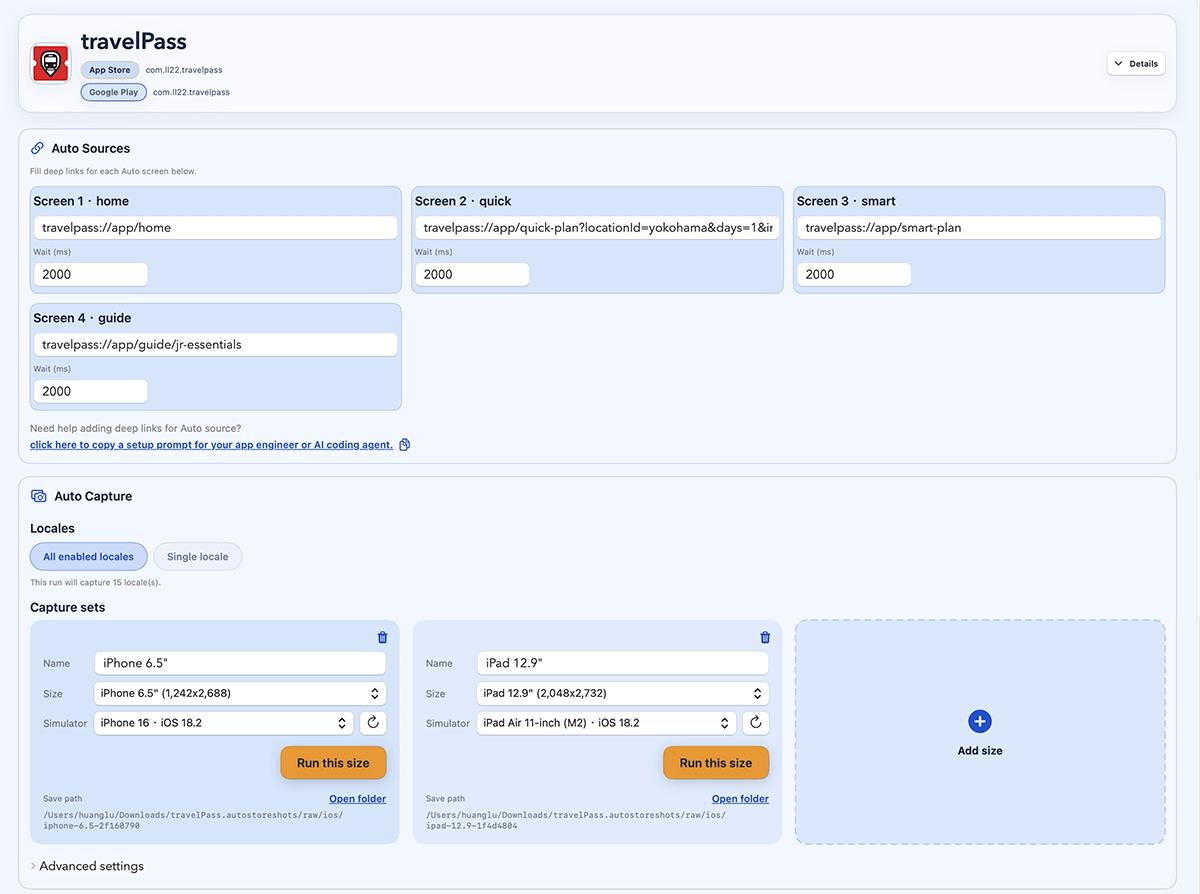
Define capture links for the screens and states that belong in your App Store or Google Play listing.
How it works
Four steps from capture target to store-ready files.
Define screen targets
Add setup links
Run capture batches
Preview and export
Screen targeting
A store screenshot starts by reaching the right page
Save target screens
Keep the route or link for every screenshot slot instead of navigating manually each time.
Pass state in the link
Use URL parameters or setup links for locale, selected item, account state, sample data, and scroll position.
Capture in batches
Run target screens across devices and languages, then continue into preview and export.
Demo
See deeplink targets become store screenshots
FAQ
Questions before you download.
Do I need deeplinks?
Automatic capture works best when your app can open the screens you want through deeplinks, routes, or intent URLs. You can also use manual uploads for screens that cannot be automated yet.
What can a capture link control?
That depends on your app. A good screenshot link can open a screen and optionally set locale, data, feature flags, selected records, login state, or scroll position.
Can I still upload screenshots manually?
Yes. Manual upload is useful for screens that do not have stable deeplinks yet.
Can it prepare sample data?
You can run setup links before capture, use demo accounts, or pass state through your capture links so screenshots use stable sample data instead of live user data.
Is this a web app or a macOS app?
Store Screenshot Studio is a macOS app. The website handles downloads, account, billing, support, and product resources.