Store Screenshot Studio
Automate app screenshot capture across languages, screens, states, and sample data
Stop treating store screenshots as one-off images. Define the capture inputs first, then finish localization, templates, preview, and export in one macOS workflow.
macOS app. Start free with 100 successful exports/month.
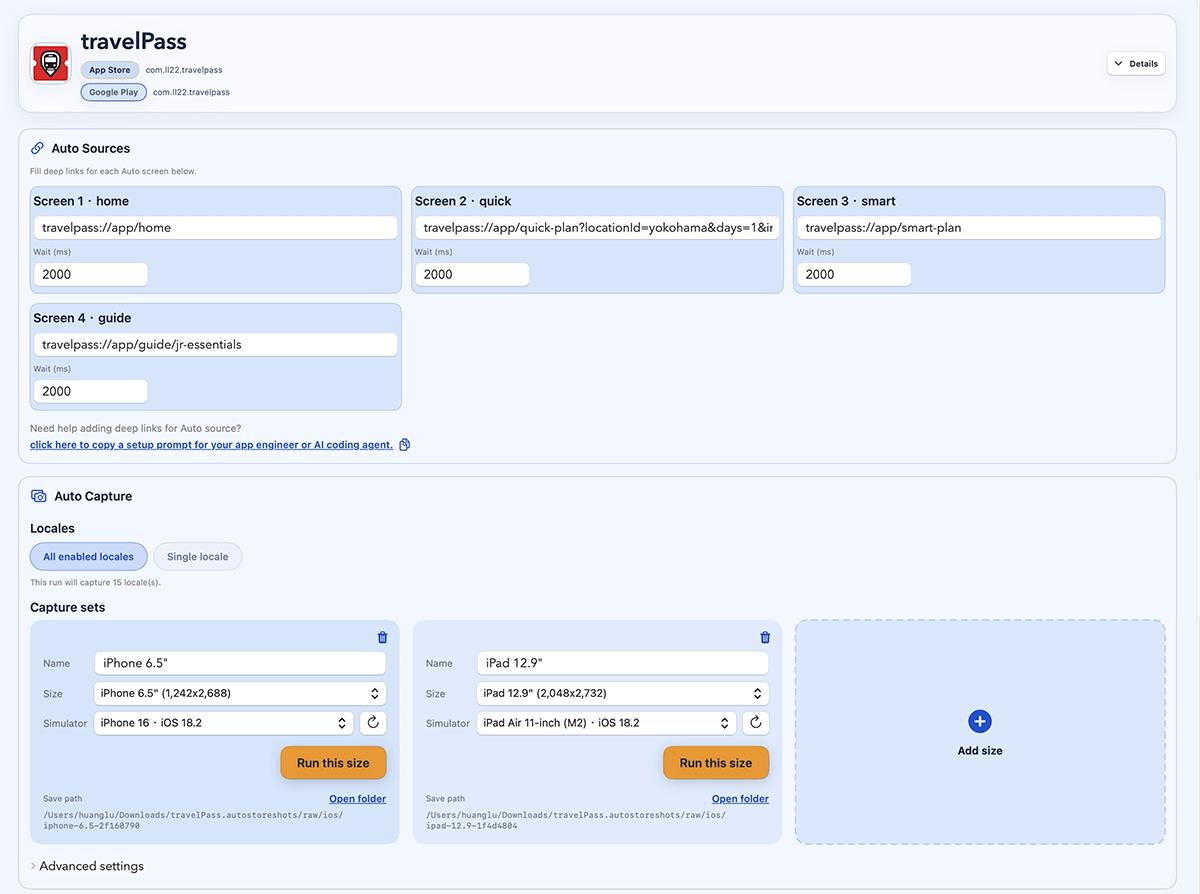
Capture the hard part first: language, screen, app state, sample data, device, and repeatable output.
How it works
Four steps from capture target to store-ready files.
Define capture inputs
Run automated capture
Review layout and copy
Export store folders
Automation
The automation starts before design
Capture real app screens
Define screens and devices, then open the right app state before the screenshot is taken.
Scale across locales
Run the same capture setup for each language and review localized copy before export.
Finish in one place
Apply templates, preview layouts, and export App Store or Google Play folders from the same project.
Demo
See automated screenshot capture from target to export
FAQ
Questions before you download.
What does it automate?
It helps automate screenshot capture inputs: screen, language, device, app state, wait timing, setup links, sample data, and final export.
Do I need deeplinks?
Automatic capture works best when your app can open the screens you want through deeplinks, routes, or intent URLs. You can also use manual uploads for screens that cannot be automated yet.
Can it prepare sample data?
You can run setup links before capture, use demo accounts, or pass state through your capture links so screenshots use stable sample data instead of live user data.
Does it support App Store and Google Play?
Yes. You can create screenshot projects for iOS, Android, or both, then export complete store-ready screenshot sets.
Can I use it for free?
Yes. You can start free with 100 successful exports per month. Failed exports do not count against that limit.